Imagine what can happen if the French and other governments would start pouring all the money into developing that further in the open, rather than just giving it all to Microsoft instead?
Most of the cost (to the government) for Windows is "support" (in a very general sense) and that cost isn't disappearing with Linux.
Especially since it is easier to find badly underpaid (and not particularly competent) Windows sysadmins than it is to find badly underpaid Linux admins.
Ok but the license fees are, what, 50 quid? times say, 3k or 30k people? A 150k or 1.5m injection into the linux ecosystem to develop those would pay for a _lot_ of developers and a _lot_ of developer time.
From what I heard about NGI-zero, another government sponsorship project (1), the problem so far is primarily finding the projects that need sponsorship.
That doesn't seem correct. Almost all of the projects installed on a standard Linux distro need funding. I just stopped applying to NLnet after getting nothing but rejections.
Are you implying that need for support would go away?
If anything the demand would be artificially high at the start of a mass migration, and then presumably level out to something similar to what we see today with Windows.
Not a thing any longer, for the most part. People know how to open a browser on any operating system these days. Go to the menu, run it. Get bored and click the X on the top bar. Source: nearby kids. A few times I've said... "this is Cinnamon, or KDE, or... Windows."
I have worked on things like PSD2, a well oiled government-led machine that just works. There are some dysfunctional things, then there are things working perfectly fine.
They'll start pulling Linux in a direction that suites them, which will potentially be at odds with the preferences of open source software enthusiasts.
They might have an effect in the development of an office suite, possibly of a desktop environment or one specialized Linux distribution. Nobody will be forced to use those specific ones if they don't like them. There are plenty of options in the Linux world.
The so called free market really did a bang up job didn't it? The proprietary buggy mess of Windows and the walled garden of MacOS which given its *nix underpinnings could have been really fantastically awesome but instead is a proprietary buggy mess.
It looks like the president - which was a businessman - will make a huge damage to American IT businesses. And IT stocks dominate the S&P 500, comprising roughly 1/3 of the index's total market capitalization... Good luck America!
One eu country or another has been talking about this for at least a decade. Nothing will happen this time either, or we'll get another of those things like the weird owncloud knock off that is totally developed by the EU
On the other hand in 2018 Europe managed to sort out LNG etc pretty quick.
I'm kind of surprised it hasn't been louder and faster after the tariffs came in, but we've already had investigation after investigation into monopoly practices, the EU is working on domestic payment processing. So the political will is there. I assume they're just quietly getting on with sorting it out.
Is slightly disagree. Trump brought in the tariffs based on trade imbalances. Bringing services into the conversation would highlight that there isn't a trade imbalance. But then I'm not trying to guess what trump might do with any given input.
Law is irrelevant under the power of the gun; it was the threat to invade Greenland and the threat to leave NATO which have triggered this.
(people keep saying things like "only Congress has the power to declare war"; that may be technically true, but a war declaration is a piece of paper, and practically the authorization of force is at the personal disposition of the President)
Not everything makes US news but the decision by Microsoft to shut down ICC accounts after a Trump EO on sanctions really spooked a lot of EU governments.
There were general and abstract privacy threats. The current US administration however has managed to alienate the EU population as well as EU politicians.
Trump has basically ended the alliance between the western world and the US and everybody has started to built around that fact. Just one example is that the EU has finalized multiple huge trade contracts, some were in the making for decades.
I don't think the next US administration - if the US remains a democracy - will be able to fix that. The US lately has been very vocal that they don't want to be the center of the western world anymore and the western world got the message.
Reorganizing the post-WWII world order will take some time, of course, but I feel like the world is proceeding quite fast.
Sorry I thought it was the president of the US that imposed tariffs, threatened to invade Canada and Greenland, wanted to remove all Gazans from Gaza, etc, etc. not some random Reddit poster. My mistake.
> Linux still doesn't have anywhere near as nice and cohesive as Group Policy, Active Directory etc.
Enterprise environments use a number of tools like Powerbroker, UCS, Centrify/Delinea etc to bind linux machines to active directory and manage identity and access through active directory. This is for mixed environments with both Windows and Linux machines.
For pure linux environments, there are a number of tools like FreeIPA/IdM, Samba AD/DC (for A/D like management), and OpenText's eDirectory for the current version of Novell's eDirectory counterpart to A/D. They all provide centralized user/host/policy/access management.
Since Entra+Intune are the recent MS products, cloud-based equivalents are Jumpcloud+Fleet, Okta PAM, FreeIPA/IdM.
> Linux still doesn't have anywhere near as nice and cohesive as Group Policy, Active Directory etc.
Isn't it about time someone developed one?
The foundations are there; you can imagine an organization deploying laptops with, say, Ansible, and not giving users root on them. LDAP sort of matches the old capabilities of AD, but not completely. There's even a "SAMBA as fake domain controller" mode.
Ironically what it needs is a product or service which organizations can pay to take the problem off their hands. But then people get stuck in never paying for anything in the open source world.
Honest question: Why? If you want a Windows-like environment, run Windows.
I get this all the time when people ask about a Linux equivalent for something, and aren't really satistied when it doesn't work or look the same. Linux isn't a clone of Windows. Linux comes from an older heritage, and has a unique culture. You are in for a hard time if you want to use Linux like you would use Windows. That's a suboptimal experience, at best.
That said, of course Linux should be easy to manage. But Windows is from a single corporate entity, of course their management tools will be different. It used to be unix admins that laughed about people using Windows as servers. The culture around Linux is one of scriptabiliy where even the user interface, the basic shell, is one where every command is inherently a script. That's why management on Linux looks like Ansible and OpenSSH, not like Remote Desktop and Group Policies.
You could write something like Group Policies for Linux of course, but it wouldn't be a complete solution so people would just continue using Ansible, OpenSSH, and the respective package managers.
> If you want a Windows-like environment, run Windows.
One of these questions where we, those doing the discourse, need to pick apart what the word "you" refers to here.
In this context, it is national governments, who have started to fear that there may come a day when they are not allowed to or able to or safe to run Windows. That gives rise to the question, "how can we get a system that minimizes the disruption of migrating away to Windows?"
Ultimately it's not about specifically wanting AD or GP as technologies, either, but the things they enable: seamless single-sign-on across an organization, and management of software security and updates across a fleet of desktops.
(possibly the thing that fills this hole is simply a fleet of consultants which go around explaining things to CIOs!)
Right, I see where you are coming from, I still want to make the stronger argument that we should not strive to re-work Linux in Windows' image. Most such initiatives, like gconf/dconf, have severely degraded the desktop experience.
I have some experience at places where Linux are run on desktops at scale, but they all have in common that these are engineers for whom Linux is the better experience to begin with. It's not like that for administrative staff and management. And as much as I'd like to tell people to use Prezi instead of Powerpoint, and Markdown instead of Word, sometimes Libre Office is the best answer.
We have to be practical. Still, I feel that too often it is engineering that has to use tools intended for administrative people. Once in a while, they other way around may not be that bad.
For a modern workplace, where smartphone and cloud based applications rule, the traditional Windows tools like AD and GP can only do so much. You also need MDM tools, and something like SAML. If you are looking for an out-of-the-box tool that can manage both Linux and Windows clients, Red Hat has FreeIPA. It's not AD, but it goes beyond that capability.
Because it works really well for a corporate environment where you require central management for your devices. Yes, the environments of Linux and Windows are different as you said, and unfortunately that means one will generally be better than the other within certain contexts. The corporate workstation use case is a gigantic one that Windows is currently dominating in, and this is terrible for Linux adoption because it means to get a job at a place that uses Windows you are incentivized to use it yourself so you can learn it. It also means that schools (which are often run like businesses internally) are way more likely to use it, so new students that are just learning how to use a computer are coming up on Windows.
Linux is indeed very different from Windows and that's fine, that isn't a problem at all and it has plenty of upsides. What should be clear is that this particular use case is a remarkable downside for Linux, and the mass adoption of Windows in the majority of businesses should make that self evident. Realistically Linux can and absolutely is used in business contexts in the same way as Windows (hence why France is going ahead with it), but it isn't as optimized for it as Windows is, when it totally could be. Macs have had some robust management platforms made for them that I've found pretty similar to AD for example. If someone developed a straight out AD clone for Linux that functioned more or less the same on the front-end it would be huge for Linux adoption in my opinion. Hopefully that answers your question.
I'm not up on my current windows security, but windows has been dominating for decades, much of which it's security was non existent, being originally a single user system. Linux being a nix is multi user from the ground up.
So you seem to be making a conclusion that isn't warranted.
That isn't to say any of this is wrong per se. Just that being the best does not necessarily lead to success.
Fair enough, but I think many people miss that something can be suboptimal in one way and very optimal in another. As an example, plenty of people here hail ffmpeg as the most optimal way to convert videos between formats, and for the technically inclined it sure is. Despite that, probably 99% of people that have ever needed to convert a video haven't touched it/don't know its name and never will because its interface is totally suboptimal. "It is the best and not successful" can be read as a true statement, but it leaves out that it is the best in this one sense and is far from the best in another sense.
To bring this back to the point I have found that AD is well documented, functions generally the same everywhere, and has an intuitive enough interface that you can get not-super-techy interns on the helpdesk up to speed on reseting passwords in it in short order. I couldn't say the same for any Linux management system I've touched, so even though you could say "system management on Linux is the best" and have that be a true statement, you're still missing where it fails and why that area matters to businesses.
I don't think we disagree. Problem is Linux users, of which I'm one, self selected to reject that ease because it's limiting. There's still a tension now, eg Gnome that is insistent on going all Mac in removing all options.
My personal suspicion is that you aren't going to get Linux to become what the windows users want it to be without it stopping being Linux. We've seen this with Android. So in some ways the rejection of centralisation on the Linux community is the thing that keeps it being Linux, for better or worse.
Right but windows also aims to be backwards compatible which means it was trying to run things designed for a single user system undermining protections.
'vim' wasn't designed for multi-user use. Nor was emacs.
Applications don't need to somehow be "designed" for multi-user systems. It's up to the underlying system to enforce application isolation in various ways, which NT has and does.
Does vim expect to be able to delete files in /bin?
If vim tried to create, modify and delete files willy nilly It would quickly run into problems. I would guess vim keeps it's temp files in /tmp and config files in ~/.vimrc?
Windows doesn't/didn't have any of this. If you want to be compatible with lotus123 and lotus123 writes it's tmp files to the root directory, you need to keep it writable, or you break lotus123.
I don't know. What's the Windows equivalent of dpkg (from 1993) and ssh (from 1995)?
Still nothing, three decades later. Not because Microsoft engineers couldn't do it, of course, but becasue they didn't want to. It doesn't fit the Windows model. They did recently adopt SSH, but that was because they want to use Windows in cloud-like environments, where expectations are set by Linux-style tools.
By the time Windows got to the point where it even could be centrally managed in any reasonable fashion, Linux environments was routinely run an order of magnitude larger still.
There is a reason why the whole cloud runs Linux. Anything else is a rounding error. That's because Linux is inherently so much less work to manage at scale.
If something like Group Policies would somehow be accepted by the Linux community, that could only be a step backwards. A well run Ansible or Puppet or similar environment works on a completely different scale.
They are not exactly equivalents, but that's not the point. I try to expand on this answer in the sibling comment.
What's important to notice however, is that the oldest of these are from 2009. At no time in the intervening 15 years (!) did someone say "Windows is unusable for desktops because it is not manageable".
Isn't WinRM/PowerShell/RDP equivalent of SSH, and dpdk/apt-get is basically .msi with group policies for installation? This has been there for decades probably?
Group Policies also allow you to enforce things like browser configuration (proxy, homepage, search engine etc.) wallpapers, screen locks etc.
Can this be done on Linux? Honestly, I have no idea - I think gnome with gsettings/dconf can do that, but can KDE?
That's the point I want to convey is that while there are tools like MSI on Windows, many years after Linux had dpkg, it's not the same thing. On Linux the package manager rules the filsystem and keeps a complete database of which package owns which file. There are no exceptions, not on the parts of the filesystem where the package manager rules. Even the operating system itself and all patches is handled by the package manager.
That's first and foremost a cultural difference, not a technical. Sure, there's nothing to prevent a Linux vendor to write "install scripts" that copy files willy-nilly across the file system, and many vendors have done this but always with disastrous results and since Linux people hate it, those products are either repackaged or stored in a separate directory far away from other files.
This means installing software at scale (any number of systems), or the question how to cleanly uninstall software it not a question you should ever ask in a Linux environment. The questions you should ask are different in a Linux environment. That is why the tools look different.
Tools like gsettings are culturally alien to the unix world. Instead, home directories are seeded with dotfiles. And dotfiles are kept in version control. Yes, that means that unix people can't answer the quesion how to lock the proxy settings so the user is unable to change them. Instead, should a sensitive system require it, they would instead manage by policy and disallow any traffic outside said proxy.
I mean, Linux package managers are so great that we have at least 2 different ways of delivering software (especially GUI software) to Linux distributions that depends on "app images". To me that shows that none of those approaches are solving 100% of problems that you encounter in the wild.
> This means installing software at scale (any number of systems), or the question how to cleanly uninstall software it not a question you should ever ask in a Linux environment.
And yet this is a problem that so many third-party vendors who try to support multiple Linux distributions have been struggling for years.
> Tools like gsettings are culturally alien to the unix world.
Sure, Linux and UNIX are coming from different roots, but "cultural" means nothing in large organizations, where computers are basically tools not that far from printers, projectors, even hammers. A way to do someone's job. I may hate locked systems, but then I don't have to support users who cannot find their trash bin on the desktop anymore.
You can seed dotfiles for all users, but you can't really enforce that user cannot for example move his taskbar from bottom to the top of the screen without policy enforcement. gsettings/dconf may be culturally alien to this world, but it is (or at least was) solving an actual problem. A problem we may not care about, but some companies do.
Now, I think there is an interesting discussion here to be had - given this latest push from Windows to Linux, as a way of distancing Europe from US, would adding features that bridge this policy enforcement gap between Linux and Windows is desirable?
15-20 years ago I was going to say yes, but back then I cared so much more about Linux as Windows alternative for office use. Today I actually prefer Linux Wild West and how hard it is to lock it into any sort of MDM.
> To me that shows that none of those approaches are solving 100% of problems that you encounter in the wild.
The problem is a self-enforced one by developers. They chase the newest updates instead of focusing on stability. And bundling security and feature changes. And they want to push those updates instead of people pulling it in.
> And yet this is a problem that so many third-party vendors who try to support multiple Linux distributions have been struggling for years?
Are those complaints done in good faith? Most repos allow for custom repositories. And writing a build script are not that difficult. If Calibre, VLC, Firefox, and Blender can be everywhere, so can those applications.
> A problem we may not care about, but some companies do.
Firefox has /usr/lib/firefox/distribution/policies.json which lets the sysadmin lock down what users can do with the browser. Example: If you wanted to block all extensions except for a whitelist, you could control that via that file.
There's a bazillion tools that let you manage files like that across thousands of servers/desktops but the hot one right now in enterprises is Ansible (which would make it trivial to push out an update to such a configuration).
Chrome has a similar file: /etc/opt/chrome/policies/managed/lockdown.json
"Ah yes, but what stops the user from downloading the portable version of a browser and using that?"
You can mount all user directories with +noexec. Also, Apparmor lets you control which applications can make network connections if you want to get really fine-grained.
Other applications have similar policy files. For example, Visual Studio Code has /etc/code/policy.json which—for example—would let your company lock down which extensions are allowed to be used/installed.
> Group Policies also allow you to enforce things like browser configuration (proxy, homepage, search engine etc.) wallpapers, screen locks etc.
Unix has always be about treating users like adults. The administration tools are more about the whole system and the hardware. You can always provide default or sample config, or prevent anything in HOME for being executed, but enforcing wallpapers is silly. But you can still do it by patching the software.
Lixnux version of AD is FreeIPA, with group policies translating to dconf - at least that was the way "enterprise" linux vendors (like RH or Canonical) were moving towards.
Now, how well is dconf integrated with all the software you want to run is another thing (it was done by GNOME, and ignored by KDE), and whether this is still the way they are all moving is yet another question but the infrastructure was being built.
On a Linux desktop you can lock down waaaaay TF more stuff than Group Policy allows. The only difference is you need a sysadmin that knows what they're doing. You can't just point and click a button that prevents users from connecting USB devices. Instead, you use a combination of groups, udev rules, and systemd-logind. There's also ways to do it with PAM if you want.
The most popular way to control user desktops that I've seen is to have your user login via LDAP (just like AD), optionally with Kerberos and then have their permissions to various things controlled via those groups. For example, if you were building a "desktop policy" for Linux users across your organization, you'd probably make a .deb or .rpm that installs some udev rules that grant or deny access to various things based on which groups the users are in.
Of course, you can also control things down at the user level. You could put a script in /etc/profile.d/ that does whatever you want when the user logs in. You can even make it dependent on how they login (detect remote SSH session or local login).
There's also dconf and KDE's Kiosk mode if you really want to lock shit down to annoy TF out of your users (haha).
Once you've got your Linux desktops setup the way you want (which is usually just a matter of making your_company_desktop.deb or .rpm) to customize things/permissions, you have so much power to do things you can't do on Windows. The fine-grain control in Linux is unreal: You can give a specific user access to run and do very, very specific things as root (Windows Administrator equivalent) without much effort at all.
Linux also lets you lock down the hardware in ways Windows doesn't support. For example, you can chattr +i to make certain devices/files immutable. You could compile a custom kernel that doesn't even have USB mass storage support. What's more secure than that? Haha.
BTW: You can also make all USB mass storage devices read-only with a simple udev rule. You can even add exceptions for special things!
The concept does not really exist it is a Windows thing. You could call Puppet or other config managements group policies, but Linux is not a monolith so it is more organic.
AD is LDAP+Kerberos, which has existed in the Unix/Linux world long before Microsoft bastardized it. So pick any of half a dozen LDAP server implementations and any of 3 or 4 Kerberos implementations and use those. If you want point-and-click/drool interfaces, use FreeIPA. If you really want it to look like AD, use Samba 4. Even Windows boxes will hardly know the difference.
Group policies don't exist and won't ever exist on Linux. Group policies are LDAP entries that are copied on system boot and user login into their respective parts of the local registry. Software may then read, interpret and use those registry entries. On Linux that wouldn't work for numerous reasons. First, on a multiuser system rebooting to apply configuration changes is not viable. On windows that's apparently fine because its single-user anyways, and reboots are an accepted fact of life. Also, to apply a system policy that is intended to limit what a user could do, asking the user's software nicely via registry entries is stupid and insecure. Lots of software won't even read the registry and have group policies that it will obey. Want to get around an Internet Explorer Group policy? Use Chrome or Firefox!
So what you do instead on Linux is: If it's just configuration, just copy it over, using the usual text configuration formats that are common on Linux. There are lots of tools to do this, starting from simple hack jobs like using scp to full configuration management systems like ansible or puppet. The "group" part is handled by those systems as part of their function, you can easily group/subgroup/discover/inventory/parameterize. If it's policy, so you want to restrict what a user can do, you use the higher-privileged layers of the system to put in actual restrictions, not just "group policy" suggestions. You can configure the user's home directory to be mounted noexec, so software execution after an unauthorized installation is impossible. You can put them in containers, namespaces, limit their resources and system access using cgroups, filesystem permissions, and more fine-grained permission systems like SELinux. If you are so inclined, you can forbid the user from opening files starting with the letter 'f', using eBPF syscall filters (this will of course break everything, but I needed a stupid example ;). All those can also be configured with your configuration management system of choice.
Just as a comparison: Our windows team needs 3h just to re-image a laptop, just for windows. After that, all the software needs to be reinstalled, all the data copied over. Then, after 2 days and 10 reboots or something, it will have picked up all the policies, updates and things and maybe be usable. Our Linux installation takes 45 minutes. Including all the software that was previously assigned to this system, including all the settings. It will be fully updated, configured and usable after the first reboot.
Well AD is just a really opinionated LDAP/Kerberos setup, so you’d think that there would be something that Linux could do.
But when you’re talking about enterprise management of thousands of devices, you need some kind of consistent security policy management. That requires running OS software that accepts remote policy management, which is a very specialized configuration and not just “vanilla Linux”.
You can get really far with LDAP, but I’ve only used it for remote accounts, file shares, and sudoer config. I’m sure there are more policy configurations that would be possible with a more advanced tool.
I suspect the RHEL world has something to offer here, but I’d love to see a more general and commonly supported solution developed. It would make Linux more of an option for enterprise managed endpoints.
But, I agree with you - for an enterprise customer, this really needs to be some kind of paid/supported product. I wouldn’t want the French government to rely on some scripts that worked on my small cluster.
Windows uses Group Policy (which isn't particularly secure for many reasons) while Linux uses configuration files (e.g. udev, AppArmor, stuff in /etc like fstab) in conjunction with file permissions. However, you can go way farther by compiling your own kernel that has certain functionality removed (e.g. USB mass storage).
Managing lots of configuration files/scripts across many thousands of servers, desktops, devices, etc is a long-solved problem. Most enterprises use Ansible or similar.
In almost every way, managing many thousands of Linux desktops is much simpler and more straightforward than Windows. If you're using Ansible playbooks, you can keep everything nice and tidy in a single place and everything you'd ever want to customize is managed via a plaintext file you can modify with your editor of choice.
You can organize them however you want or even use a GUI to change stuff (if you pay for Ansible Enterprise or whatever it's called... Or use one of the FOSS alternatives).
Managing Linux desktops at scale really isn't much different than managing Linux servers at scale.
No non-US government should host anything on azure, or any other US-owned cloud. Thats security and sovereignity 101, or more like 100. Reality with hostile US being as it is.
What you list are no showstoppers, and since its a well known topic I cant imagine why some EU-funded effort in say 2 billions over next 3-5 years shouldnt reaolve it once and for all, for entire world. Well invested money.
Personal computers were used in office environments long before the technologies to make them administer-able as if they were a mainframe. Before blindly jumping in and reproducing those technologies, better to ask why they emerged in the first place.
Most workplaces don't have strict bans on personal mobile devices, and some of the ones that do, don't have the kind of physical perimeter defense that can detect people getting lazy about whether or not they carry their personal mobile devices into the workplace. That makes perimeter defense into security theater anyway. We need a rethink about what we are guarding against and how we're doing it.
You're thinking security and that's a big part of it, but another part of this remote admin locked down UI demand is support & minimizing training cost. Everyone clicks the same icon in the same location to start the same business app and it starts up the same way for everyone. End users can't screw up their setup.
Long time ago I supported Linux&Windows desktops in an organization that chose to allow per-user customization, with the trade-off that if you ask for support, what support offers to do is reset your desktop (not data files) to default -- and that fixed practically all issues.
> Most workplaces don't have strict bans on personal mobile devices
If you're talking about select work apps on your mobile device, sure, but that's limited attack surface.
If you're talking about employers who let unmanaged mobile devices hop on their internal network... I've never seen that. Maybe at a hypothetically perfect zero-trust shop?
I've seen a lot of un-seriousness about security. One that's easy to spot is old unpatched IP phones that aren't segregated on the network. I've given demos at companies that are serious, where a device I accidentally left behind caused an urgent search of every room I had been in. Security didn't have to be told which rooms those were.
You likely know better than I, but I've always had a weird intuition that enterprise IT security is bifurcated into "Leaders who understand compliance+details" and "Leaders who confuse compliance for details" with very different results.
And I get it's extra work, but I've seen some weird "But if you'd just built this a bit differently, you would have gotten all these free security bonuses to your posture" gaps.
Imho, a huge part of the problem is invisibility. I'm firmly of the belief the US government should be running scans on entities in regulated industries (defense, healthcare, utility, telecom) with regulated redress of any findings.
Convenience comes as a result of mass market adoption, for products for which convenience was not already the main selling factor. Look at cars; they were kind of difficult to drive and maintain 60 years ago, now they're super convenient to drive and maintain as you essentially just press buttons and look at screens to get all needed information about the car and drive it.
It's probably something like "inception -> adoption -> convenience". For Windows it was the same, was it not? It wasn't absolutely convenient to use, it was just better (in terms of usability and features for the average consumer), and convenience came after (Windows XP, Windows 7). Sadly the functionality degraded, and now all that is left is convenience.
It does, it's called FreeIPA (or RedHat IdM). The only GPO parts it doesn't do are those that are not related to policy in the IAM sense (i.e. configuring some application related thing). There's other systems for that, just like on Windows you practically never run GPO without anything else. On top of that, you can pay RedHat or Canonical to host it all for you on any cloud or non-cloud.
The primitives are there and they're solid, beyond that it's "just" architecture and integration work. Hopefully the French government will be rational with this (I believe the time and financial constraints will for it to be, we're broke and we lack time) and they won't fall into the trap of trying to internalize every bit of the platform.
A good example of that would be what happened with Docker. Off the top of my head cgroups, namespaces, seccomp, overlays and capabilities had been around for a while before it got rolled up in a nice utility in 2013 and opensourced in 2015. Hence the containerization movement.
Solaris zones and FreeBSD jails were nice but they always were let's say a bit too bearded.
Group Policy and Active Directory are dead, for all intents and purposes.
It's now Intune (via OMA-DM), and Entra. Both of those products are about as bad as you might imagine the "cloud" versions of GP & AD might be.
They are better, in ways -- no longer having to care and feed for domain controllers is nice, and there's no longer an overhead for additive policy processing, so endpoints only get a single set of policy and log on much quicker -- but for the most part, enterprise management of Windows devices is in a worse place than it was ten years ago.
Try to figure out how long it will take an online Intune device to discover a new policy: As far as I can tell the answer is "eventually". There are bandaids for this, because of how infuriating it is, of course, but all time guarantees are basically gone.
Ask me a decade ago what an enterprise should do, and my answer would be straightforward: AD, GPO, Exchange.
> Ask me a decade ago what an enterprise should do, and my answer would be straightforward: AD, GPO, Exchange.
That was also the answer two decades ago. But if AD and GPO are now dead, what killed them and what are the options? Is the problem mobile and BYOD?
I’ve been primarily on Macs since that time where endpoint management isn’t much, so there are fewer knobs to fiddle with. In some ways it’s nice in that admins can’t screw around too much with my system. In other ways, I’m sure Macs feel limiting for those in charge of enterprise security. However, most endpoint management feels like it’s written for Windows with Macs as an afterthought for checklist security. Knowing that, I’m happy there are fewer places for dodgy software to be able to interface with the OS.
> "if AD and GPO are now dead, what killed them and what are the options?"
The changing world. AD and GPO come from the mid 1990s before pervasive internet, before WiFi, before Cloud computing, before people had multiple computers, before iPhones, before AWS cloud infrastructure, before Kubernetes, before cheap fast hardware for virtualization, before cheap bulk storage, before BYOD and WFH and everything-as-web-app. Before that was the world of isolated 8-bit machines, expensive Solaris workstations and Unix mainframes with expensive admins, and after say 1998 the world was cheap Compaq/HP/IBM hardware running Windows server and Windows 9x desktop, and after about 2003 it was Windows Small Business Server (AD, GPO, SQL, Exchange, SharePoint) and XP Pro desktops.
Cracks started showing when people wanted to logon to a laptop away from the office when it couldn't refresh policies, run logon scripts, talk to domain controllers; when people wanted 'offline files' from a company file share while away from the office, but wanted their corporate email to work when their laptop was online but not pull down company settings over a dialup modem. More cracks when they got a Blackberry or iPhone, more when AppStores appeared and people expect to be able to install whatever they like, more with the rise of Apple Macbooks, with the growth of website based services people can use from anywhere, more with Amazon AWS where company infrastructure is on someone else's premises, more with BYOD and WFH, more with people expecting software to be cost-free, being trivially able to spin up Linux web and database servers because there was plenty of CPU/RAM/Disk and no worries about licensing costs.
> "it’s nice in that admins can’t screw around too much with my system"
If it's a company device, it isn't your system. The company has legal oblications and practical concerns that conflict with your desires as an individual. That might be pushing full-disk encryption or updates, or auto-locking, or restricting use of USB or websites to block potential customer information leak points, or trying to stop you saving work locally that might be lost if the device fails, or trying to stop your device being an entry point for malware or ransomware, or trying to stop you screwing around with their system which costs them employee time to fix and your downtime while it's broken.
It was absolutely not the case two decades ago.
There were no other options for an enterprise fleet, 20 years ago, if the question was asked. If you weren't Google (who never asked the question anyway), the answer for managing 25,000 endpoints was to use Windows devices with Active Directory as the management plane. Anyone doing anything else was in for a world of hurt... and that's why every enterprise ended up on Windows, and why everyone targeting enterprise management targeted Windows -- because that's what the endpoints were already running.
What killed AD & GPO was Microsoft, in their bullheaded push toward Azure everything. Instead of listening to what it was that the enterprise customers actually wanted, they designed a system that made sense to them, but to no one else. The original UI was written in Silverlight. It was horrific.
No, I meant that Windows AD was still the answer two decades ago. I can see how that may not have been clear - I edited my post to include the quote I was replying to. (You said one decade and I was just extending that timeline back another 10 years.)
There was LDAP and Kerberos support for *nix management, but nothing you’d deploy over a thousand end devices.
And you’re right, it wasn’t a question that got asked, because there wasn’t ever a second choice - AD was the only option.
I remember it almost being a trope at the time that every Kerberos question thread eventually landed on some subtle / niche incompatibility or edge case.
No alternative, you can't realistically fully control everything everyone does on every device in their possession. It was job security for useless control freaks, the products never should have existed.
But isn't that the whole point, that foreign governments perhaps do not want Microsoft to host all their data, users, groups, software on Azure, because then the CIA also might obtain access?
> Linux still doesn't have anywhere near as nice and cohesive as Group Policy, Active Directory etc.
I take your word for it (I know of Kerberos and LDAP and Netscape and Sun trying to make such palatable, but clearly haven't followed that in the last quarter-century).
That assumes however the server to be currently MS Windows. For government agencies, I'd rather expect some Mainframe to be (and remain) in place. Surely IBM (or here rather Groupe Bull) has user authentication/authorization figured out (more than half a century ago, methinks).
I've never understood the management thing. People manage fleets of Linux machines all the time. What does group policy do that e.g. nix or ansible don't?
Group policy just sets registry keys. That's nothing you can't do any other way. The important bit is the inertia of 30 years of Windows subsystems and integration with Active Directory and 3rd party Windows ecosystem software all being written to expose internal config and look to registry keys for the settings.
For the first part, Group Policy (GPO) can set the screen to lock after 2 minutes of inactivity, say, which works because there are Windows subsystems built to look for a reg key for their config, and policy templates exposing that config in the GUI management tools. Or group policy configures which security group can "logon as a service" which works because Windows has system-wide and domain-wide pervasive Access Control Lists (ACLs). GPO configures that Background Intelligent Transfer Service (BITS) should limit its bandwidth use, which works because Windows Updates use BITS. Or sets the machine-wide SSL cipher order, because Windows software uses system-wide schannel not OpenSSL. Or GPO sets what your default printer will be and that's only useful because decades of 3rd party Windows software was written to use the standard Windows printer dialog, or User Documents path, or whatever.
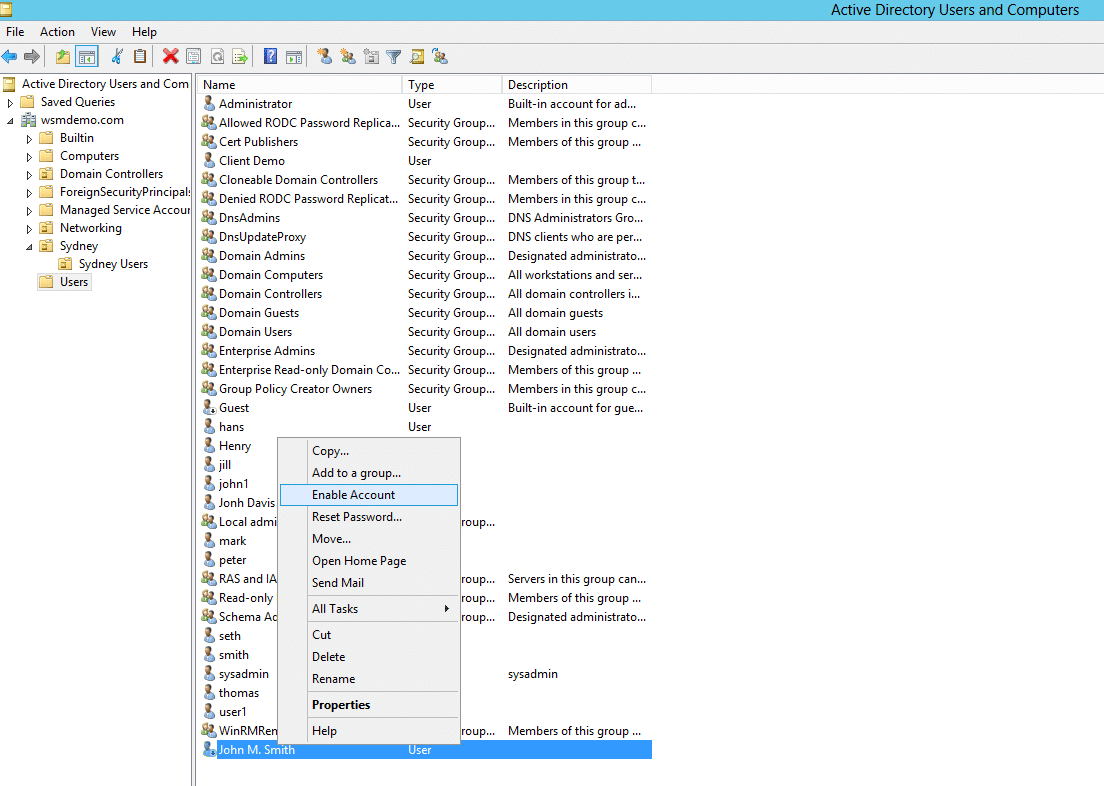
For the second part, Active Directory is a tree-shaped organization tool; in screenshot[5] that I quickly Googled, the tree on the left has a folder named "Sydney" and below that "Sydney Users"; this lets sysadmins organise the company computer accounts, user accounts, and security groups by whatever hierarchy makes sense for that company - e.g. by country, office, team, department, building floor, etc. Then Group Policy overlays on that structure, and the policies are composable.
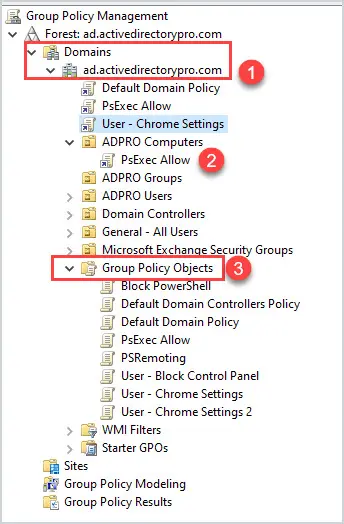
e.g. in this basic screenshot of the group policy manamement GUI[6] it's showing at the bottom a list of all group policy configurations that have been made in a domain such as "Block PowerShell", and higher up it shows the policy "PsExec Allow" has been linked inside the "ADPRO Computers" folder. So users and computers in that folder in AD, will get those policies applied. In screenshot[7] you can see a basic example showing corporate computers getting machine-wide settings, corporate users getting user-level MS Office config, and Executives get settings that nobody else gets. (This echoes the registry having separate HKEY_LOCAL_MACHINE and HKEY_CURRENT_USER subtrees). Screenshot[8] shows the relatively tidy GUI on the right for seeing which settings have been configured in a policy.
If you apply more than one GPO to a folder, the users/computers will get the all the policy settings combined. This is often what people complain about when logging on to a corporate Windows machine takes ages, btw. You can filter GPOs on a case-by-case basis to build patterns like "apply this machine-wide policy to all computers in the Sydney folder which are members of the WarehouseComputer security group" or "apply these logon-settings to employees in New York who are members of Finance and logging onto a laptop". So companies which have been around for years can have really (messy) big and intricate designs which would be a lot of work to migrate.
3rd party programs can release XML files which plug into the GPO management, and the programs were written to expect to be configured by registry keys so they can pick up those settings; there are templates for configuring FireFox[1], Chrome[2] Adobe Acrobat[3], Word, Excel, Office[4], VMWare Horizon, Lenovo Dock Manager, Zoom, RealVNC, LibreOffice, Citrix, FoxIT Reader, and so on. The more enterprisey a tool is, the more likely it will plug into that ecosystem. Then all kinds of 3rd party reporting and auditing tools look there to see if your company is compliant with this or that; the whole thing is integrated with Windows' domain-wide ACLs so you can give some admins permissions to view or edit just their regional subset of this.
As usual the lockin is not that they do something amazing that nothing else can do, the lockin is that Windows domains have been around in this format for 30 years since NT4 and Windows 2000, and it has huge inertia, familiarity, is deeply embedded in a lot of companies, you can easily and cheaply hire lots of people who know how to use and manage it, you can send screenshots of it to auditors and they understand it, if you don't know how but you have a bit of (oldschool) Windows experience then clicking around will get you the basics, you can buy 3rd party auditing software that will send you a management friendly report with green ticks saying almost everything is fine but you should change this setting for security...
[Yes of course you can build your own custom replacement for every single thing, just like you can build your own custom replacement for any software; it's "just" ldap and kerberos and dns and some scripts and site-to-site policy replication and management tools und und und].
Putting it in the hands on the GNOME foundation will just result in a lot of new soon-to-be-mandatory APIs and numerous configuration variables with only one allowed value.
Honestly as wide spread as it is, managing group policy sanely is still a challenge I've found - it's very resistant to configuration as code.
Linux has a lot of the pieces but is principally lacking a solid distribution system - in particular a big missing component is the network-based SELinux policy distribution system which you can see some hooks in for the concept of a "policy server" which never eventuated.
SELinux would be a lot more viable if it had a solid way to federate and distribute policy and has some nice features in that regard (i.e. the notion that networked systems can exchange policy tags to preserve tagging across network connections).
> managing group policy sanely is still a challenge I've found - it's very resistant to configuration as code
Imho, this was historically (and continues to be) Microsoft's Achilles heel.
Large parts of the company reflexively wrote features / tooling as manual-first, code-second (or never).
In hindsight, what was missing was a Gates-level memo circa 2000 similar to Amazon's API one: all teams are required to build their configurators to be programmatically exposed.
Unfortunately, I don't think Ballmer was enough of a technologist (and was likely too distracted) to intuit that path not taken.
This is actually a good time to disrupt that, as Microsoft’s attention is not on windows and Active Directory is slowly moving to Entra, although big enterprises are mostly hybrid.
Some places are using Okta for many of those functions too. Trump’s instinctive parasitic slumlord behavior may be enough for the sleepy Europeans to get their shit together.
that's the catch with gp/ad. for a lot of orgs the hard part is intune/entra now. swapping the desktop is easy. replacing identity and device management is the real migration
Okay, but why do this now? If it’s such an important feature and unrelated to the barrage of legislation, why was this not implemented a few months or years ago?
Because someone came with a pull request for this; this additional field was meant to support a feature in something else they were working on (an xdg portal). It was a simple PR that addressed a need that the programmer had. And it was accepted.
Because we hear so many stories where the scammer directed their target to install an app so that their scam works
I know a lot more people that install newpipe than people that got scammed by any means, and have never heard of anyone being asked to install an app by a scammer
But I was scammed by newpipe! It said I can watch YouTube, but there aren't any ads! Now I don't know what to buy. It even had CCC Media, so now my videos are informative and insightful. Where's my influencers?!
I would assume because the Soviet Union had a recognised successor state (being the Russian Federation), where as Yugoslavia did not have a recognised successor state.
Thou hast well said, Yugoslavia has no successor states: For Yugo hast had five successor states; and the domain thou now hast is not thy successor state: in that saidst thou truly.
If I'm not mistaken, and please correct me if I am, the last republic to leave the USSR was Kazakhstan - making that nation the actual USSR successor state. Though the capital was in Moscow, Russia left the USSR while the USSR still existed, and thus is not the USSR successor state.
Legally Russia is the internationally recognized successor state. Russia even paid off the whole Soviet debt, but in exchange inherited all of the USSR's legal privileges (right to have nukes under NPT, right to the spot on the Sec Council, right to observer state in Danube, etc)
> the compositor then composites them together. to me, that feels more like the kernel is at the center of the diagram here: the wayland compositor is between the kernel and the output / input.
It's also possible to use hardware planes to get the actual graphics device to composite for you directly from its video memory, effectively reducing latency to the lowest possible.



reply